
Lesson 3: Email Essentials — Driving Action with Email
Social Media Marketing, Community and EMAIL
Section outline
-
Lesson 3: Email Essentials — Driving Action with Email
-
Students mustMark as done
When to Use Email vs. Social Media
To master digital marketing, you must understand that different channels serve entirely different psychological purposes. If you treat an email like a tweet, it will fail.
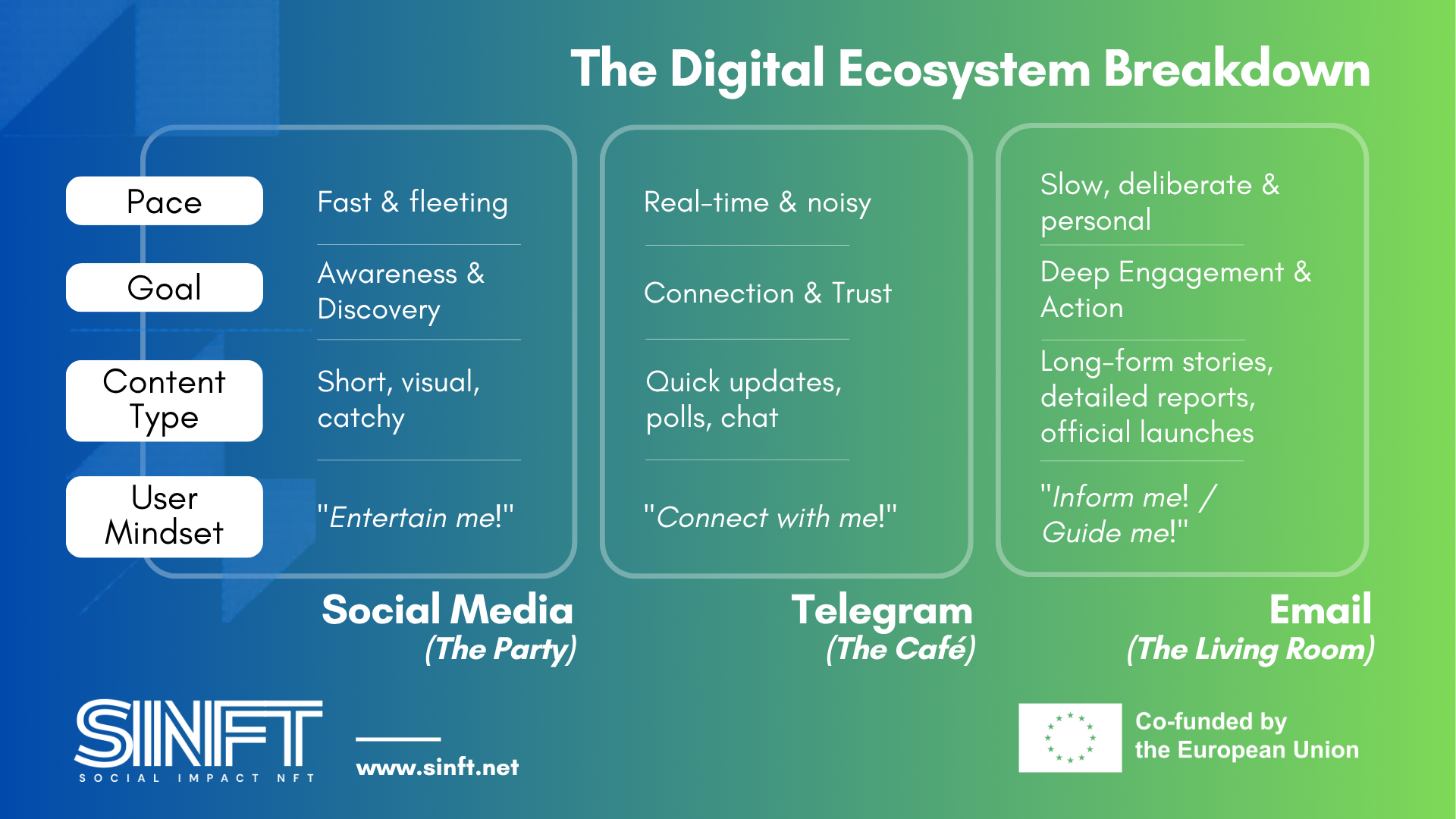
The Golden Rule: Use social media to find people. Use Telegram to talk with them. Use email to guide them towards a significant action.
Case in Point: The Fundraising Push
Imagine you need to raise $10,000 in 48 hours to fund an emergency clean-water well.
- On Instagram/Facebook: You post the link. It gets 5,000 views, but people are scrolling too fast. They "like" it and move on. (Conversion rate: 0.1%).
- On Telegram: You post the link. The community cheers, but 5 minutes later, 20 people start discussing a new crypto token, and your link is buried 100 messages up. (Conversion rate: 1%).
- Via Email: You send a dedicated, emotional story directly to 1,000 inboxes. There are no distractions. The only thing on their screen is your story and a big "Donate Now" button. (Conversion rate: 5-10%). -
Students mustMark as done
Email Basics: Crafting the Perfect Message
An email inbox is a fiercely competitive space. You are competing with their boss, their bank, and their favourite clothing brands. To stand out, your emails must be human-centred, beautifully structured, and completely free of corporate jargon.
The Subject Line: The Gatekeeper
Your subject line has one job: to get the email opened. It should spark curiosity or highlight a massive benefit without being "clickbait."
❌ Bad (Boring): Newsletter #14 - November Project Update
❌ Bad (Spammy): URGENT!!! MINT OPEN NOW TO CHANGE THE WORLD!!Winning Subject Line Formulas:
- The Curiosity Gap: "We didn't expect this to happen..." or "The surprising results of our latest clean-water initiative 💧"
- The Direct Benefit: "Your early access link for the new NFT drop" or "How your donation was spent this month."
- The Personal Question: "Quick question about the community, [First Name]?" (Research by Campaign Monitor shows that personalized subject lines boost open rates by 26%).
The Universal Email Structure (The "F" Pattern)
People do not read emails; they scan them. Eye-tracking studies by the Nielsen Norman Group show that we read digital content in an "F" shape – reading the top line fully, then scanning down the left side. Structure your email to fit this behaviour:
- The Hook (Introduction): A warm greeting and a compelling first sentence that immediately states why you are writing. Forget
"I hope this email finds you well."Start with action: "Today is a massive day for our community." - The Value (Main Message): The story, the impact report, or the exclusive insight. Show, don't just tell. Use short paragraphs (max 3 sentences) and bold text for key phrases.
- The Call to Action (CTA): A single, unmissable button or link telling the reader exactly what to do next. Do not confuse them with five different links.
- The P.S. (Postscript): This is a copywriter's secret weapon. According to direct marketing psychology, the P.S. is frequently the most read part of an email after the subject line. Use it to restate your main call to action or add a sense of urgency. (e.g., "P.S. The allowlist closes in exactly 12 hours. Grab your spot here.")
-
Students mustMark as done
Collecting Emails
People guard their email addresses closely. They will not give you their email just because you put a generic
"Subscribe to our newsletter"box on your website. You must offer a Lead Magnet – an incentive that provides immediate, tangible value in exchange for their contact details.- The Allowlist/Whitelist Spot: "Enter your email to guarantee early access to our upcoming NFT mint before the public." (Highly effective for crypto audiences).
- The Transparency Report: "Want to see exactly how blockchain is solving local poverty? Download our exclusive 5-page impact report." (Great for philanthropists).
- The Digital Toolkit/Art: "Sign up and get 3 high-resolution digital wallpapers from our lead artist, plus weekly project updates."
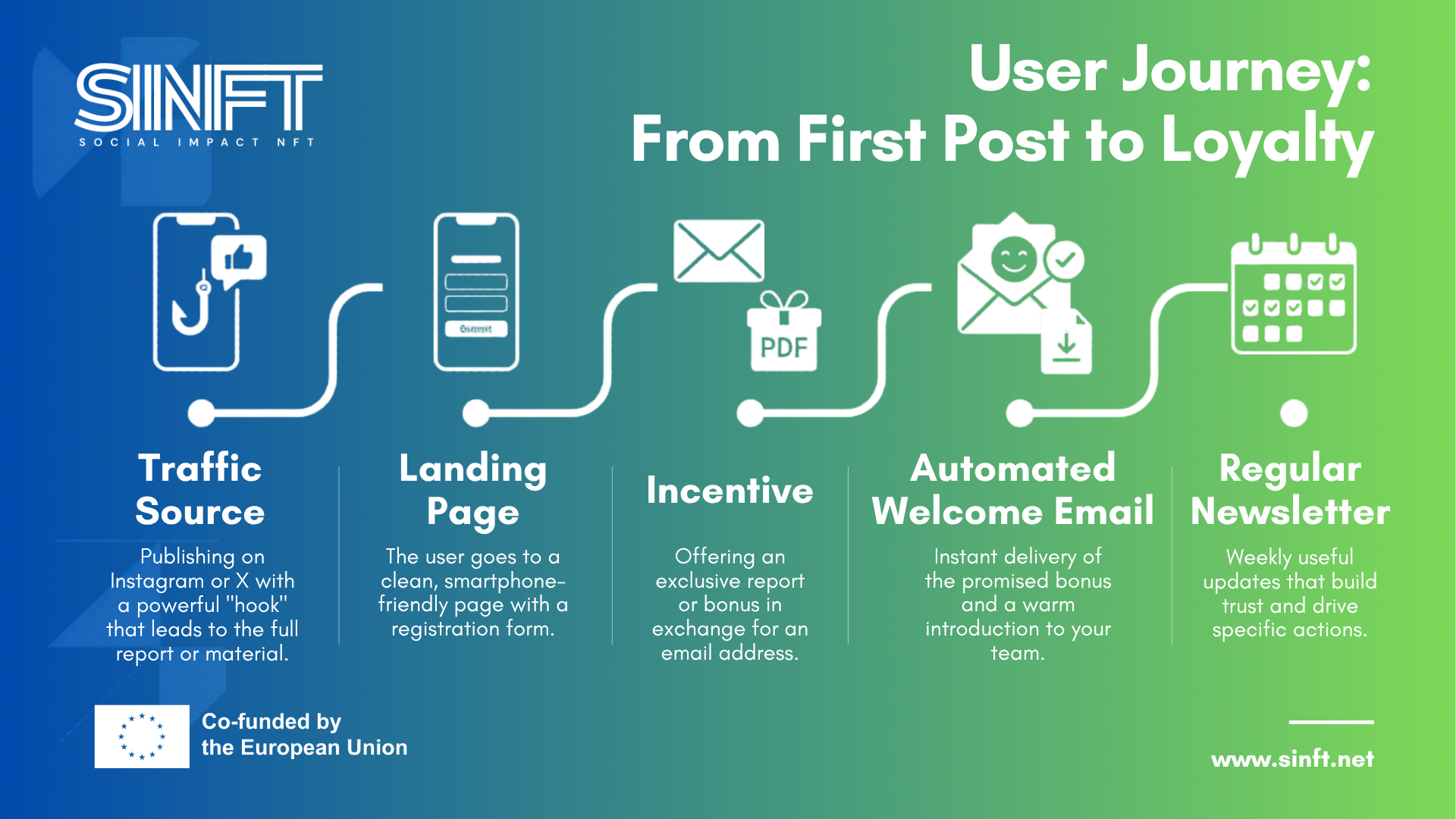
Below is the standard, high-converting pathway to turn a casual scroller into a subscriber:
-
Students mustMark as done
Using eSputnik for Campaigns
To manage thousands of subscribers legally and efficiently, you need an Email Service Provider (ESP). While we don't strictly endorse just one single tool, eSputnik stands out as one of the best platforms for beginners that doesn't compromise on functionality. It is a powerful, professional-grade platform favoured for its intuitive interface, advanced segmentation, automated workflows, and multi-channel capabilities (allowing you to seamlessly combine Email, SMS and Web Push notifications as you grow).
The Automation Magic: The 3-Part Welcome Sequence
The biggest mistake beginners make is collecting an email and then staying silent for a month until they need to sell something.
When someone signs up, their interest is at its absolute peak. You must use eSputnik's workflow builder to set up an Automated Welcome Sequence. These emails trigger automatically while you sleep.
Email 1: The Delivery (Sent Immediately)
Subject: "Welcome! Here is your requested report 🎁"
Goal: Deliver the Lead Magnet you promised. Briefly introduce the project's core mission. Set expectations ("I will email you once a week").Email 2: The Story (Sent 2 Days Later)
Subject: "Why did we actually start this..."
Goal: Humanise the project. Share the "founder's story" or a highly emotional story about the social cause you are fighting for. No selling allowed here.Email 3: The Community Ask (Sent 4 Days Later)
Subject: "Come say hello!👋🏻"
Goal: Invite them to take a low-friction action. Ask them to join your Telegram group or follow you on Instagram. This integrates them into your daily ecosystem.The Technical Side of Segmentation & Avatars
Never send the exact same email to everyone. Segmentation means dividing your audience into distinct groups based on their behaviour and profile. In eSputnik, this is handled through Tags, Data Fields, and Dynamic Groups.
Let's look at how we technically segment our two core Avatars:

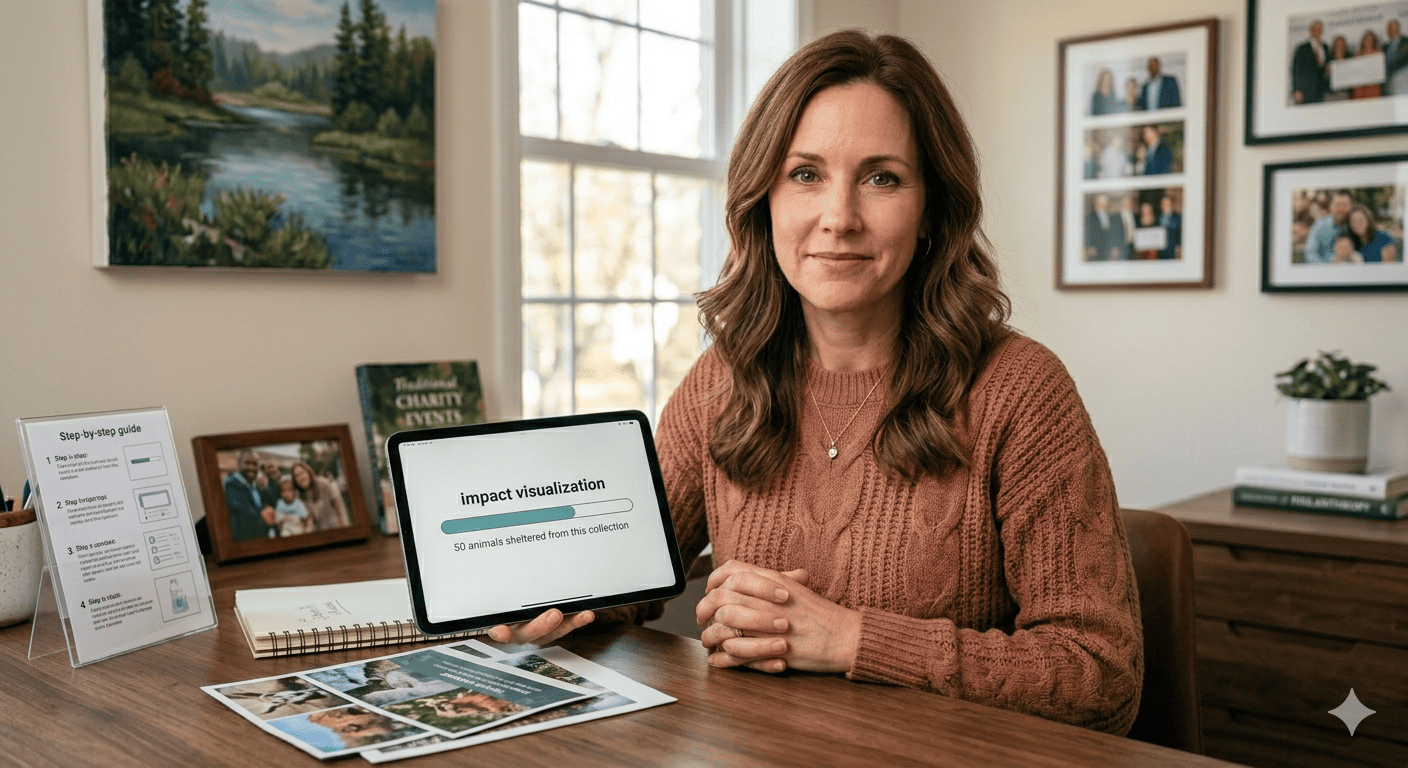
"Alex" (The Crypto Native) "Sarah" (The Traditional Philanthropist) The Setup: When Alex signs up via an Allowlist link, eSputnik automatically assigns him a tag (e.g., Tag: Web3_Interested). When Sarah signs up via your website's "Download Impact Report" form, eSputnik assigns her a tag (e.g., Tag: Charity_Focused).
The Content: You create a segment targeting this tag. You send Alex highly technical updates about smart contracts, tokenomics, and exclusive Discord AMA sessions. You send Sarah emotional storytelling, real-world photos of your social impact, and updates on how funds are being used. You exclude the heavy crypto jargon that might scare her away.
Step-by-Step Guide: Creating a Campaign in eSputnik
Theory is great, but execution is what drives results. Staring at a blank email editor can be intimidating for beginners. To help you overcome this, we have created the Email Campaign Blueprint – a visual, step-by-step guide.
Follow along with the visual guide and the steps below to transform a standard eSputnik template into a professional, branded newsletter for your project.
Once your test email looks perfect, it is time to share your message with the world:
- Save and Proceed: Save your message and navigate to the sending options in eSputnik.
- Choose your Segment: This is where your segmentation strategy comes into play. Select the specific contact group or tag you want to receive this email. For example, you might send a highly technical update to "Segment: Web3_Interested", or a general newsletter to "All Subscribers".
- Schedule or Send: Choose whether to blast the email immediately or schedule it for an optimal time (like a Tuesday morning). Hit Send!
💡 The Power of Visual Intuition
Congratulations, you've just built a professional campaign! Remember, the secret to great email design for beginners is observation – building your visual intuition (or "eye for design"). By consistently analyzing and using high-quality templates, you will naturally learn how to balance whitespace, typography, and imagery. With time and experience, you will graduate from modifying templates to building your own beautiful custom layouts completely from scratch. But for now, rely on proven templates, keep your design clean, and focus on delivering a powerful message. -
Students mustMark as done
Deliverability & Engaging Your Audience
Getting someone to open your email is only half the battle. Making sure the email actually reaches their inbox (and not the Spam folder) requires strategy.
The Deliverability Basics
Email providers like Gmail and Outlook have strict algorithms. If you look like a spammer, you will be filtered out.
- Avoid Spam Triggers: Do not use ALL CAPS in your subject line. Avoid excessive exclamation marks
(!!!). Limit words likeFREE, $$$, or URGENT. - Clean Your List: If someone hasn't opened your last 10 emails, remove them. Having a smaller list of highly engaged readers is vastly superior to a massive list of "ghosts" who drag down your sender reputation.
- Ask to be "Allowlisted": In your very first Welcome Email, ask the reader to drag your email from the "Promotions" tab to their "Primary" inbox.
The Rule of One
When writing, apply the "Rule of One": One Reader, One Idea, One Action. Do not write your email addressing a crowd (
"Hey guys!"). Write it as if you are sending a personal update to one specific person. Focus the email on one single idea (e.g., "Today we partnered with OceanSave"), and ask them to take one specific action at the end.Focus on "project-for-society" narratives. People connect with human resilience.
-
Share behind-the-scenes struggles and how your team overcame them.
-
Spotlight a specific community member who contributed a brilliant idea.
Encouraging Replies
Email does not have to be a one-way street. The algorithms of major email providers look at replies as the ultimate sign of a high-quality, trusted sender. If people reply to your newsletters, your emails will almost never go to Spam.
How to encourage replies:
- Ask a direct question at the end of the email: "Which of these two community initiatives should we fund next? Hit reply and let me know your thoughts!"
- Ditch the
noreply@yourproject.comaddress. Always send from a real person's name and address, like name@yourproject.com.
- Avoid Spam Triggers: Do not use ALL CAPS in your subject line. Avoid excessive exclamation marks
-
Ready to test your knowledge?
Take this quick 5-question quiz to review the key concepts covered in this lesson. This brief knowledge check will help you reinforce what you've learned and ensure you're ready to apply these new strategies to your own project.

Shape the Future.
Mint the Change.