Lesson 6 - NFT Markeplace
NFT Creation & Minting
Section outline
-
🛒 NFT Marketplace – List, sell, and fund your mission
After you’ve minted your NFTs, you’re automatically redirected to your campaign panel where all mission information is displayed. To start selling, go to My Listings (top navigation → Creator menu → My Listings). The “Ready to list” section shows all minted, unlisted NFTs.
Click “List for impact” next to an artwork – a listing form opens. Here you can set the price in USD using preset buttons ($10, $25, $50, …) or type your own amount.
⚠️ Important for Lab members
A predefined percentage of each sale will be split equally among the wallets of all Lab members. Therefore, every Lab member must have a connected wallet on the platform before you can list an NFT. Another predefined percentage goes to platform operational costs.After setting the price, click “List NFT” and confirm the transaction in Phantom. The listing costs 2 credits. Once confirmed, the NFT appears live on the marketplace.
Explore the marketplace – navigate to Marketplace to see all listed collections and NFTs. Click any NFT card to view the detail page with price, artist split, and a “Buy” button. Click a cause card to filter only that campaign’s listings.
On the My Listings panel, you can also remove NFTs from the marketplace if needed.
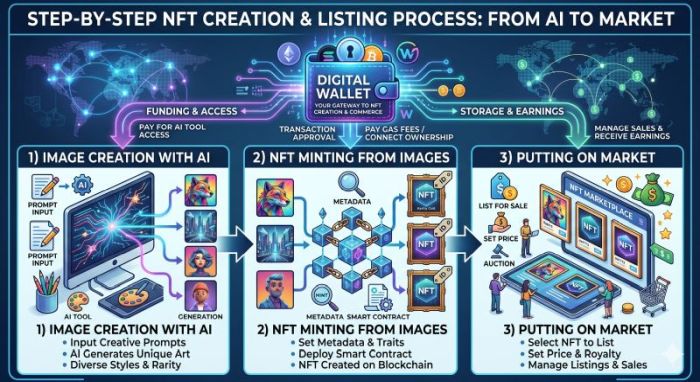
👇 Check out the image below – it shows the NFT creation process and how to put NFTs on marketplace.
-
Students mustMark as done
After minting, go to My Listings and click “List for impact” to set a price in USD. Important: all Lab members must have a connected wallet because sale proceeds are split equally among them. Listing costs 2 credits – then your NFT appears on the marketplace, ready for buyers to discover and support your mission.
-

Shape the Future.
Mint the Change.